ImageFree Verified

Chalkboard Infographic Illustration

A hand-drawn chalkboard explainer that turns a short process or concept into one clear visual. Best for teaching slides, course materials, and social posts where the relationships matter more than decorative detail.

sl-chalkboard-infographic-illustration sample output

What you get

  • One high-resolution chalkboard illustration
  • A diagram with clear directional flow
  • A restrained palette and tactile chalk marks
  • Short labels checked against your wording

Good fit

  • Three- or four-step teaching frameworks
  • Simple cycles and cause-and-effect explanations
  • Editorial or social graphics for educational content

Not for

  • Detailed statistical charts
  • Infographics requiring long blocks of copy
  • Photorealistic images

What you provide

  • Topic and main takeaway
  • Ordered concepts or stages
  • Exact labels to display
  • Audience and intended placement

Requirements

  • Node.js 20+
  • A SkillLoom generation key (prepaid)

Running cost

Each image is generated with your prepaid SkillLoom generation key (about $0.05 per image at 1K). Subscriptions do not include generation credits.

A typical run costs about $0.05 at sub2api prices, charged to your prepaid key.

Try this prompt

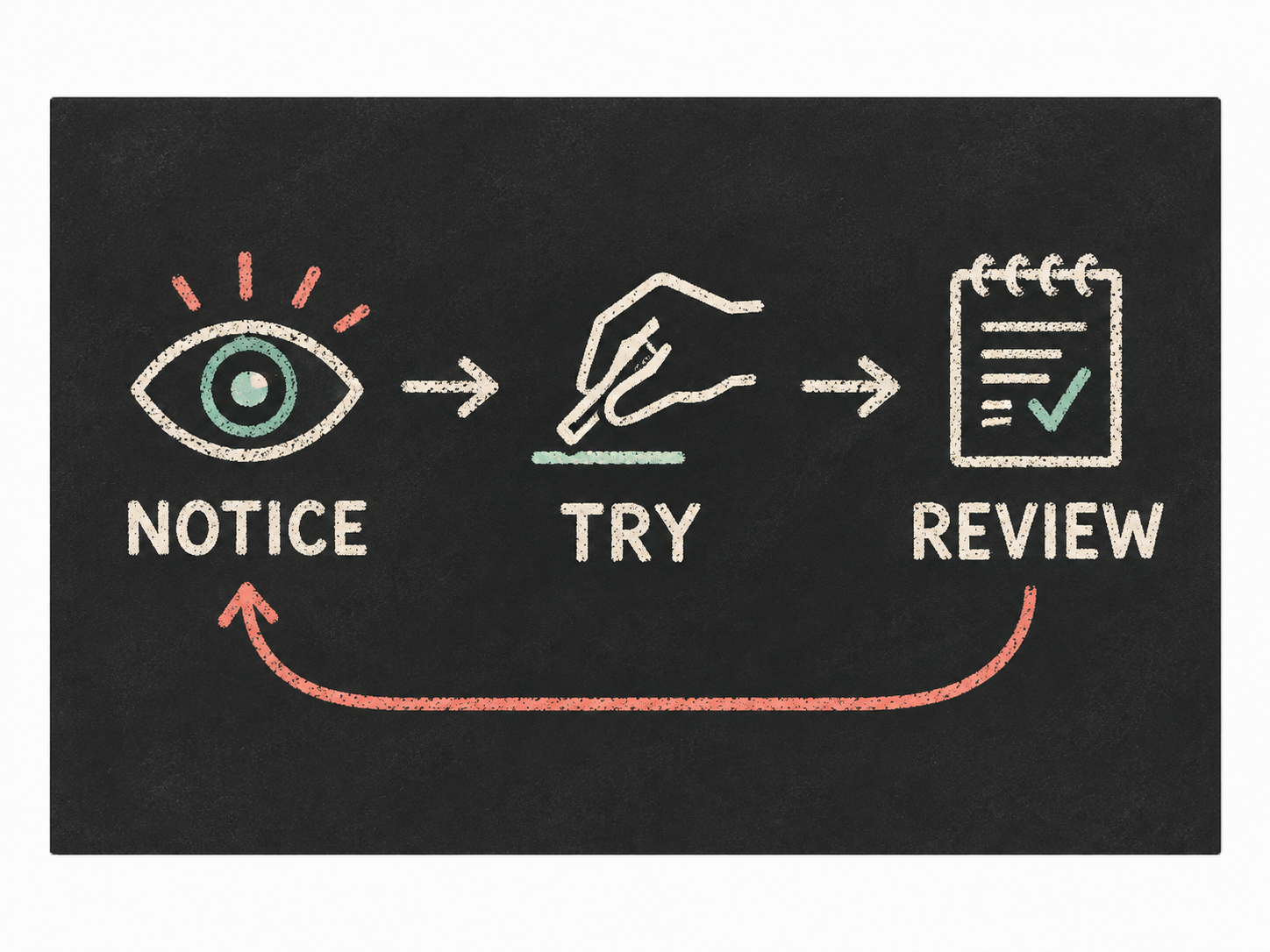
/sl-chalkboard-infographic-illustration Create a 4:3 presentation-slide graphic for adult learners in a short online course, showing a repeatable practice loop for learning a new technique: an eye for NOTICE, a hand testing a small mark for TRY, and a checked notebook for REVIEW, left to right, with an arrow returning to NOTICE. Render exactly these labels, once each: NOTICE, TRY, REVIEW. Use a clear chalk-drawn style.

Follow-up prompts

  • Make the return arrow more prominent without adding any new text.
  • Simplify the icons so each stage reads clearly at thumbnail size.

Verification

Verified

render-checkpass5.0 / 5222s

FAQ

How much text can the illustration include?

Use a few short labels, ideally no more than four. Put detailed explanations in accompanying copy so the diagram stays readable.

Can it show a cycle instead of a linear process?

Yes. Specify where the final stage returns, and the connecting arrows will make that relationship visible.

SKILL.md

SKILL.md

Chalkboard Infographic Illustration

Turn a concise explanation into a legible chalkboard infographic with hand-drawn lines and a clear reading order.

Style: Chalk Logic. A classroom diagram drawn with care: tactile and informal, but precise enough to teach from. Follow references/style-guide.md exactly.

Use this skill when

  • Three- or four-step teaching frameworks
  • Simple cycles and cause-and-effect explanations
  • Editorial or social graphics for educational content

Do not use

  • Dense, data-heavy charts requiring exact numeric plotting
  • Diagrams with extensive paragraphs or many mandatory labels
  • Photorealistic classroom scenes
  • To reproduce another company's brand, logo, product UI or copyrighted characters.

Inputs

  • The idea or process the graphic must explain
  • The exact stages or concepts, in their intended order
  • Exact wording for any labels that must appear
  • Audience and publishing placement
  • Any factual relationships or claims that must be preserved

If something essential is missing, ask one short question before starting. Never invent facts, numbers, quotes or customer names; mark gaps as [needs source].

Workflow

  1. Collect the brief fields listed in references/prompt-framework.md. If any text will appear in the image, confirm it letter by letter and freeze it.
  2. Build the prompt with references/prompt-framework.md, following references/visual-system.md for subject, composition, light, palette and the text policy. Write it to prompt.txt.
  3. Check that the generation key is configured: SKILLLOOM_API_KEY and SKILLLOOM_BASE_URL (run npx skillloom doctor --write-env if not).
  4. Tell the user the image is paid from their prepaid key (see the cost note) and get explicit approval.
  5. Generate one image. The task id is saved first, so re-running the same command resumes instead of paying twice:

``bash node scripts/generate.mjs --prompt-file prompt.txt --output image.png --task-file image-task.json --confirm-paid ``

  1. Run the validator and fix every problem it reports:

``bash node scripts/validate-image.mjs image.png ``

What makes this excellent

  • Reduce the brief to one visual proposition before prompting: a sequence, cycle, comparison, or hierarchy.
  • Match the connector geometry to that proposition; a cycle needs a visible return path, not just a row of arrows.
  • Assign each concept a concrete, recognizable chalk icon rather than an abstract decorative doodle.
  • Keep exact labels few and short; inspect the generated image for spelling, order, and duplicated or invented text.
  • Ensure the diagram remains understandable when reduced to a social-feed thumbnail.
  • Treat chalk grain as a surface detail, never as a substitute for legible lines or sufficient contrast.

Output contract

  • One PNG at 4:3, at least 1000px wide, following the visual system; any approved text spelled exactly.
  • No logos, watermarks or real people's likenesses unless the user owns them.
  • A hand-off note with the final prompt, the task file path and the validator output.
  • Deliver one generated illustration at the specified ratio and minimum width.
  • Check all visible words against the supplied labels before delivery; disclose any text errors that remain.

Reference demo and agent run

The preview image was generated from the sample brief in scripts/image-spec.json. In a real run the agent fills the brief from the user's request, generates with the user's key, checks the result against the output contract (required text, ratio, no extra words) and regenerates when it misses.

Failure rules

  • If the API reports a low balance or a limit, stop and tell the user; never switch providers or keys silently.
  • If text is misspelled or the composition misses the visual system, ask before generating again. Never retry automatically; every attempt is paid.
  • Never print or store the API key in files you hand over.

Similar skills

Chalkboard Infographic Illustration · SkillLoom