ImageFree Verified

Chibi Anime Flat Geometric Illustration

Generate an original chibi anime character with a compact silhouette, crisp geometric construction, and a soft-vinyl-toy finish. Use it for avatars, product mascots, brand exploration, or a consistent character series. Each run creates one polished illustration from your brief.

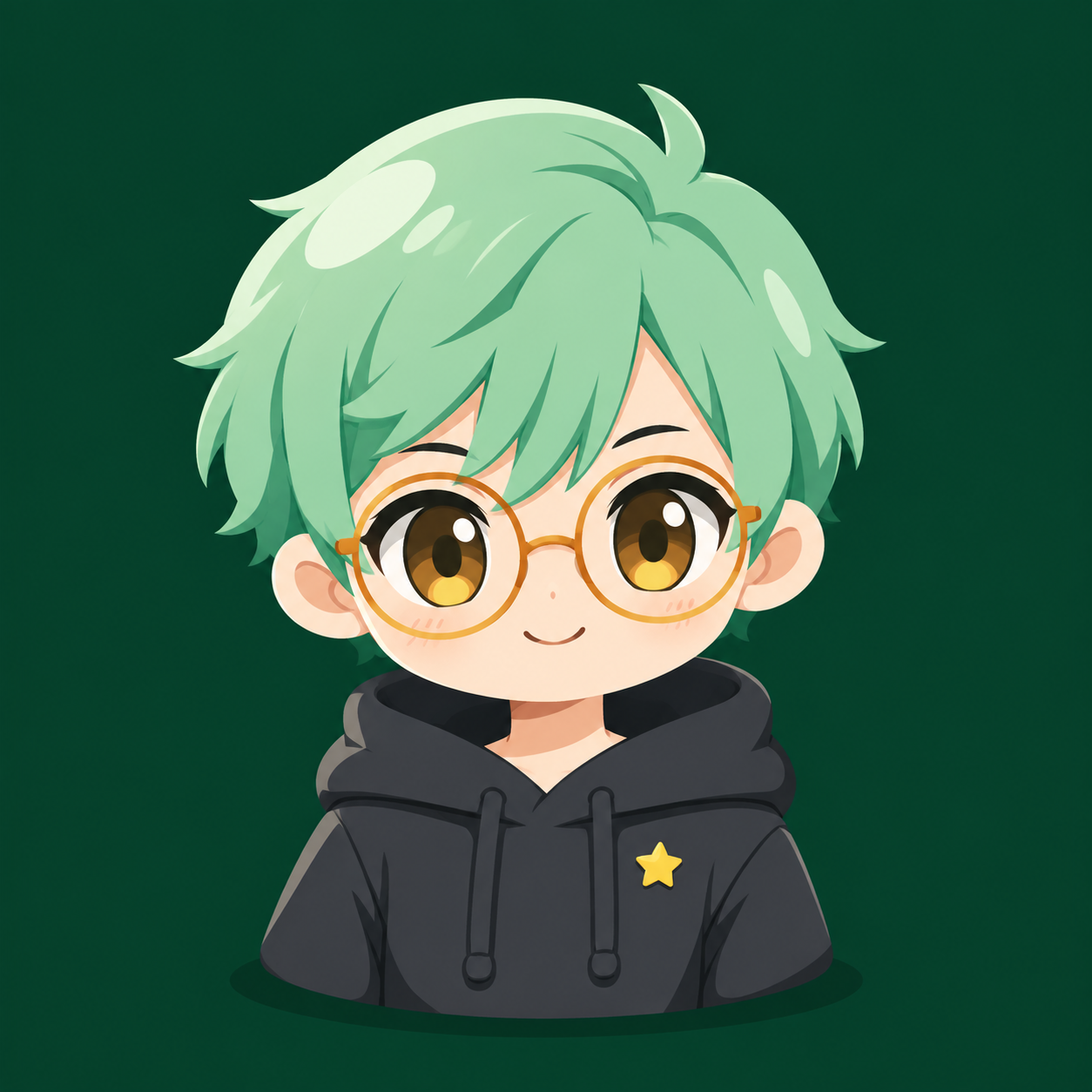
sl-chibi-anime-flat-geometric-illustration sample output

What you get

  • One high-resolution character illustration
  • A clear, thumbnail-readable silhouette and expression
  • A restrained palette on a saturated color ground
  • Series-conscious proportions and repeatable style cues

Good fit

  • Creators developing a recognizable avatar or mascot
  • Illustrators exploring a consistent chibi character direction
  • Indie teams making original character-led identity art

Not for

  • Photorealism or richly rendered scene illustration
  • Replicas of known characters, brands, or real people

What you provide

  • Character role and personality
  • Appearance, outfit, and one signature detail
  • Canvas ratio and intended use

Requirements

  • Node.js 20+
  • A SkillLoom generation key (prepaid)

Running cost

Each image is generated with your prepaid SkillLoom generation key (about $0.05 per image at 1K). Subscriptions do not include generation credits.

A typical run costs about $0.05 at sub2api prices, charged to your prepaid key.

Try this prompt

/sl-chibi-anime-flat-geometric-illustration Create a 1:1 square avatar of an original upbeat, focused, approachable night-shift developer with short mint hair, round amber glasses, a charcoal hoodie, and one tiny yellow star pin. Keep the friendly expression readable at thumbnail size, with clean bold-grid chibi geometry. Include no text, letters, logos, labels, or watermark.

Follow-up prompts

  • Make a second pose while preserving the face, proportions, palette, and star pin.
  • Create a seated version with the same character identity and a simpler silhouette.
  • Use a coral ground and keep every other defining character feature unchanged.

Verification

Verified

render-checkpass4.0 / 547s

FAQ

Can I keep a character consistent across images?

Yes. Reuse the same proportion, facial, palette, and signature-detail description, and specify what may change for each new pose or scene.

Can I provide a reference image?

You can describe the traits to preserve, such as hair shape or outfit colors. The result should remain an original character rather than a copy of a protected design.

Will the image include text?

No. The default output is illustration-only, which keeps the character clean and usable as an avatar or identity asset.

SKILL.md

SKILL.md

Chibi Anime Flat Geometric Illustration

Create one original chibi anime character illustration with crisp geometric shapes, a soft-vinyl finish, and a repeatable visual identity.

Style: Bold Grid Chibi. Playful and composed, with a clear character silhouette grounded by one saturated canvas color. Follow references/style-guide.md exactly.

Use this skill when

  • Creators developing a recognizable avatar or mascot
  • Illustrators exploring a consistent chibi character direction
  • Indie teams making original character-led identity art

Do not use

  • Photorealistic portraits, painterly scenes, or detailed environmental concept art
  • Exact replicas of existing copyrighted characters, real people, or branded mascots
  • To reproduce another company's brand, logo, product UI or copyrighted characters.

Inputs

  • Character role, personality, and intended audience
  • Distinctive appearance, clothing, and one signature detail
  • Preferred canvas ratio and intended placement
  • Optional palette or existing series reference description

If something essential is missing, ask one short question before starting. Never invent facts, numbers, quotes or customer names; mark gaps as [needs source].

Workflow

  1. Collect the brief fields listed in references/prompt-framework.md. If any text will appear in the image, confirm it letter by letter and freeze it.
  2. Build the prompt with references/prompt-framework.md, following references/visual-system.md for subject, composition, light, palette and the text policy. Write it to prompt.txt.
  3. Check that the generation key is configured: SKILLLOOM_API_KEY and SKILLLOOM_BASE_URL (run npx skillloom doctor --write-env if not).
  4. Tell the user the image is paid from their prepaid key (see the cost note) and get explicit approval.
  5. Generate one image. The task id is saved first, so re-running the same command resumes instead of paying twice:

``bash node scripts/generate.mjs --prompt-file prompt.txt --output image.png --task-file image-task.json --confirm-paid ``

  1. Run the validator and fix every problem it reports:

``bash node scripts/validate-image.mjs image.png ``

What makes this excellent

  • Translate the brief into a memorable silhouette and one signature detail before adding clothing or props.
  • For a series, preserve head-to-body ratio, eye spacing, light direction, and ground color; vary only brief-specific traits.
  • Choose a pose that reads at small avatar scale, with hands and accessories separated from the body silhouette.
  • Use crisp flat color boundaries; reserve soft shading for a few broad vinyl-like highlights and the grounding shadow.
  • Keep the character centered with enough clear margin for circular profile crops unless the user specifies another placement.
  • Treat any supplied character reference as descriptive guidance; do not reproduce protected characters, brands, or identifiable people.

Output contract

  • One PNG at 1:1, at least 1000px wide, following the visual system; any approved text spelled exactly.
  • No logos, watermarks or real people's likenesses unless the user owns them.
  • A hand-off note with the final prompt, the task file path and the validator output.
  • Generate one original illustration at the requested ratio and minimum width.
  • Keep the character silhouette and signature details legible at thumbnail scale.
  • Deliver a clean image without lettering, watermark, logo, or mockup framing.

Reference demo and agent run

The preview image was generated from the sample brief in scripts/image-spec.json. In a real run the agent fills the brief from the user's request, generates with the user's key, checks the result against the output contract (required text, ratio, no extra words) and regenerates when it misses.

Failure rules

  • If the API reports a low balance or a limit, stop and tell the user; never switch providers or keys silently.
  • If text is misspelled or the composition misses the visual system, ask before generating again. Never retry automatically; every attempt is paid.
  • Never print or store the API key in files you hand over.

Similar skills