 VideoVerified
Question List To Audience Motion Clip
Works with: Claude Code, Cursor, OpenCode, Codex, Gemini CLI


All premium skills for $9.99/month. Cancel anytime.
Upgrade nowUse it to make a video.
npx skillloom-cli install sl-column-annotations-motion-clip
Built for
Updated Oct 10, 2026

 VideoVerified
 VideoVerified
 VideoVerified
 VideoVerified
 VideoVerified
 VideoVerified
 VideoVerified
 VideoVerified
You say
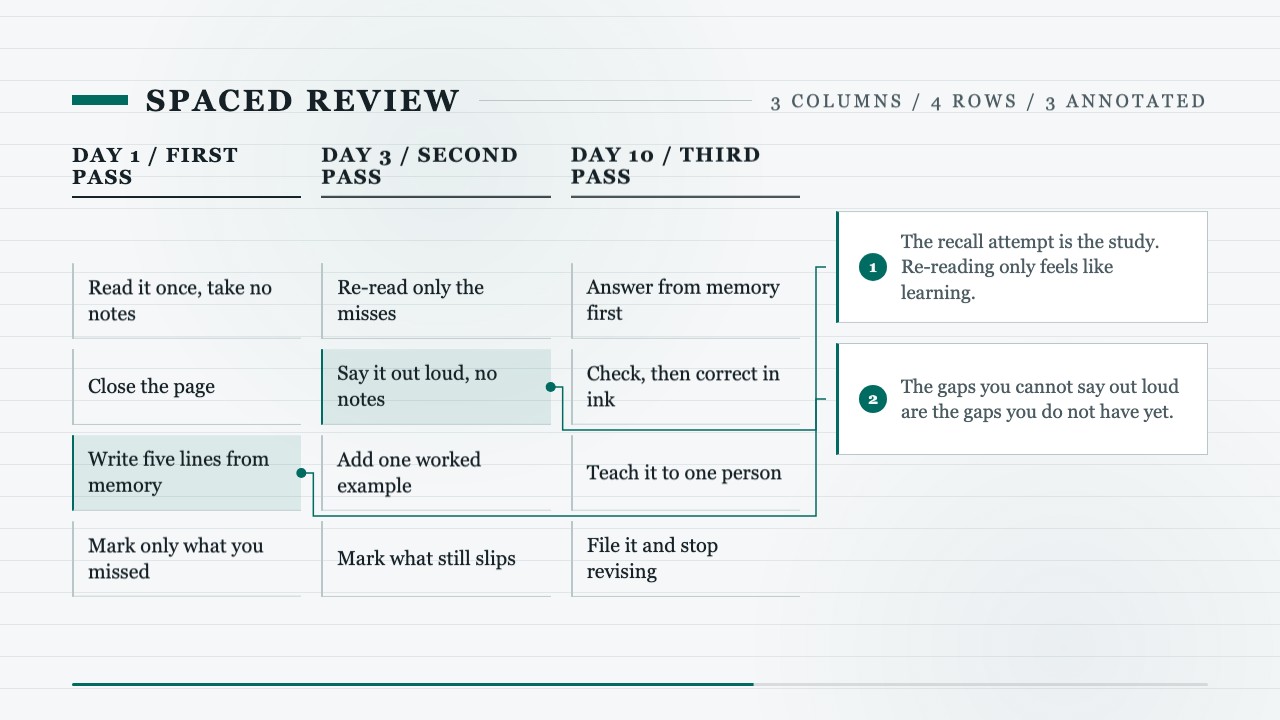
/sl-column-annotations-motion-clip Make a 10.5-second 16:9 clip on spaced review. Three columns: DAY 1 / FIRST PASS, DAY 3 / SECOND PASS, DAY 10 / THIRD PASS, four comparable rows each, ending on “File it and stop revising.” Annotate row three of column one with “The recall attempt is the study. Re-reading only feels like learning.”, row two of column two with the out-loud test, and row four of column three with why a fourth pass is not worth it. Close on “Make room to remember.”
Keep the same grid but annotate only the first and last columns.
Replace the three passes with my own revision schedule, same row structure.
Give each annotation half a second longer and shorten the opening title.
No external services or generation models. Renders locally.
5.0/ 5
Render score
Verified
| Real render check | Verified | 5.0 / 5 | 35s |
|---|
Yes. Column heads, rows, annotation text and the row each leader points at are plain values in the HTML/CSS source; re-render locally.
Row geometry is computed at build time on a fixed stage, so each leader path is drawn from that row's exact pixel coordinates.
Two or three. Each one needs a beat of its own, and a 6-to-12-second clip cannot land four leaders and still be readable.